
Which setup fits you: terminal, desktop app, VS Code or an existing Clash
| Your situation | What to do | Watch out for |
|---|---|---|
| Running claude in the terminal (CLI) | Export HTTPS_PROXY before launching, or put it in the env block of ~/.claude/settings.json | The proxy URL needs the http:// prefix; the official docs say SOCKS is not supported |
| Local sessions in the Claude desktop app’s Code tab | Put it in the env block of ~/.claude/settings.json, or add it to a saved local environment | If the app already starts the session with the same variable, the value in settings.json is ignored |
| VS Code extension | Put it in the env block of ~/.claude/settings.json, which the extension shares with the CLI | The extension also has a claudeCode.environmentVariables setting for the Claude process it starts |
| You already run Clash, Surge or a similar proxy client | Use its HTTP or mixed port in the variables above, or turn on its TUN mode | With only the system proxy on, Claude Code may not use it; the official docs do not say it reads the system proxy |
| You do not want to set anything per tool | Use TUN to take over the whole Mac, see the TUN section below | TUN takes over all traffic; rules decide which part goes through the proxy |
How to set a proxy for Claude Code in the terminal
Lowercase variables work too. The official docs say Claude Code uses the first one set, in the order https_proxy, HTTPS_PROXY, http_proxy, HTTP_PROXY.
If your proxy needs a username and password, write http://user:password@host:port, and avoid hard-coding the password in scripts you commit.
# Valid for this terminal only
export HTTPS_PROXY=http://127.0.0.1:7890
export HTTP_PROXY=http://127.0.0.1:7890
export NO_PROXY="localhost,127.0.0.1"

# To make it permanent, add these lines to ~/.zshrc and open a new terminal
claude
Find the HTTP port of your proxy client
Look for the HTTP port or the mixed port in your proxy client. The example below uses 127.0.0.1:7890; use your own. The official docs say SOCKS is not supported, so do not use a SOCKS port.
Export the variables
Set them before you start claude. The official docs say shell variables are read once at startup, so a running session does not pick up later changes.
Start claude and check
Run claude, then type /status and look at the Proxy row. The official docs say that if the proxy URL cannot be parsed, for example when http:// is missing, Claude Code stops at launch and names the variable to fix.
Set the proxy in the settings.json env block for every project
Put the variables in the env block of ~/.claude/settings.json. Claude Code reads them straight from the file, however you launch it. The file applies to every project on your machine, and the docs say the VS Code extension, the desktop app and the terminal read the same settings files.
If the same variable is set in your shell and in the env block, the official docs say the settings value applies in most sessions, while local sessions in the desktop app keep the value the app started with. The file must be strict JSON, with no comments and no trailing commas.
Claude Code applies saved changes to a running session, but for proxy variables it is safer to restart claude and check /status again.
{
  "env": {
    "HTTPS_PROXY": "http://127.0.0.1:7890",
    "HTTP_PROXY": "http://127.0.0.1:7890",
    "NO_PROXY": "localhost,127.0.0.1"
  }
}A global proxy for Claude Code: TUN mode needs no configuration
TUN creates a virtual network interface and feeds traffic into the proxy core. The sing-box TUN inbound works on Linux, Windows and macOS, and with auto_route enabled it sets the default route to that interface.
Because the takeover happens at the network layer, the Claude Code process does not need to read any proxy variable. A claude started from the terminal, VS Code or the desktop app all pass through it. The cost is that it takes over all traffic on the Mac, so rules decide what goes through the proxy and what stays direct.
If by global proxy you mean every project using the same proxy for Claude Code, the ~/.claude/settings.json approach above is enough and you do not need TUN.
With Pax: send Claude Code through a proxy without environment variables
Pax Connect is a sing-box based Mac proxy client that routes Claude Code and Codex without environment variables, manages relay API settings, and tracks token usage and cost locally. The app interface is in Chinese, and Pax does not provide proxy connections, so you bring your own nodes or subscription.
Import your own connections
In Connections, import the nodes or subscription you already have and select the one to use.
Choose TUN and turn the proxy on
Pick TUN as the proxy mode (you can also switch to the system proxy) and complete the administrator prompt when you turn it on. With TUN on, you no longer need HTTPS_PROXY.
Run claude and send a message
Use Claude Code as usual in the terminal, VS Code or the desktop app, and send one message so it opens a fresh connection.
Check Traffic monitoring → Overview
Pax recognizes the Claude Code process. View by application to see its connections, target hosts such as api.anthropic.com, the actual route and the last matched rule. Processes are recognized by install location, currently the native install and global npm installs; if it is not recognized, the target host still tells you.
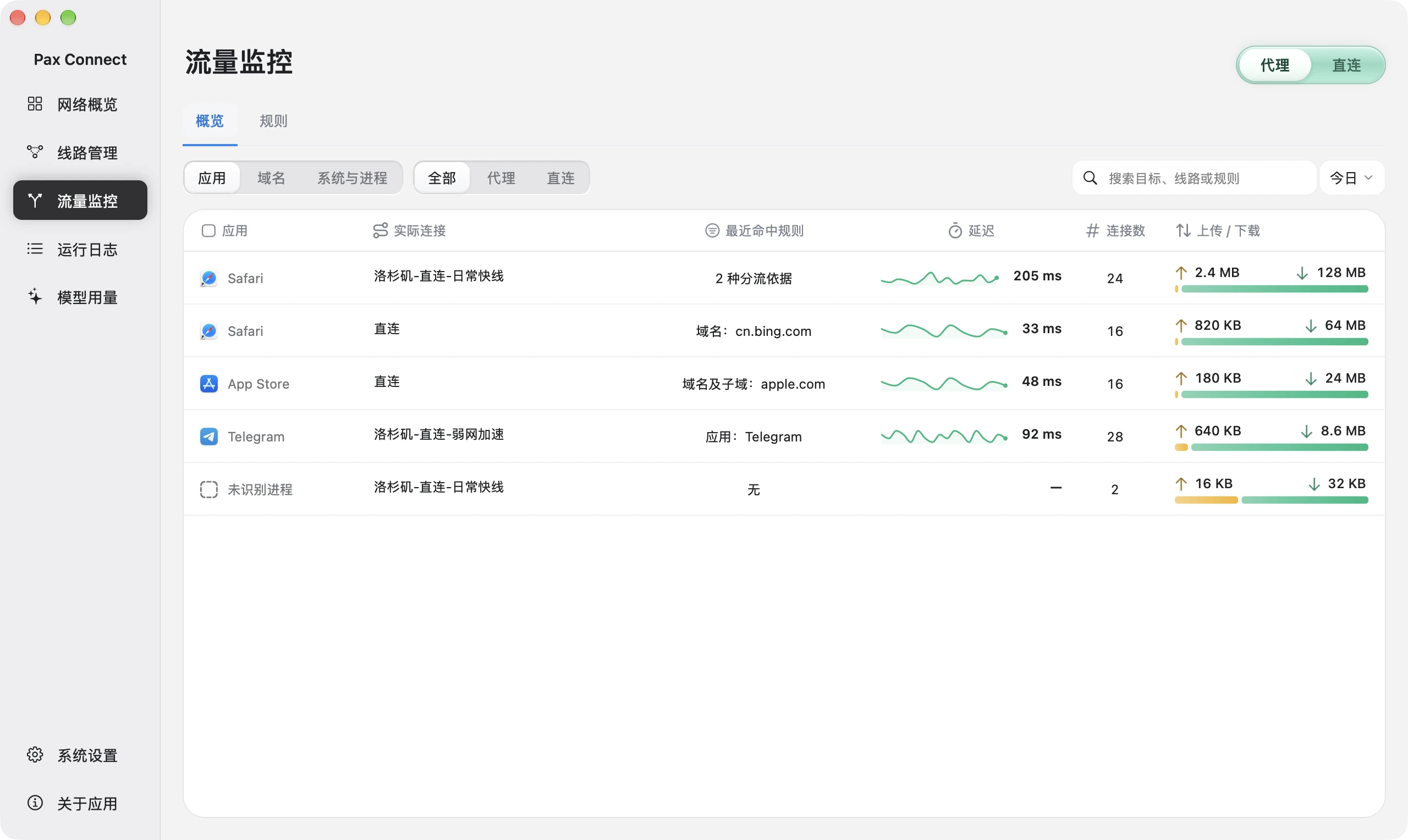
- Choose a dimension
Switch between application, domain, or system and process, then choose a time range.
- Compare rule and route
Read actual connection and matched rule separately. The proxy switch alone is not proof.
- Inspect details
Open a row for details. Bytes, connection counts and latency do not expose HTTPS message contents.
Send only Claude Code traffic through the proxy: use domain rules
Pax application routing can only pick .app applications, not a command-line program such as claude, so the interface has no option to route only the claude process. To get the same effect, use domain rules: point the hosts Claude Code needs at the proxy connection and let everything else go direct.
The official list of required hosts includes api.anthropic.com, claude.ai and platform.claude.com. A domain rule applies to the host, so opening claude.ai in a browser matches the same rule. Rules are managed under Traffic monitoring → Rules, and only connections opened after you save follow the new rule.
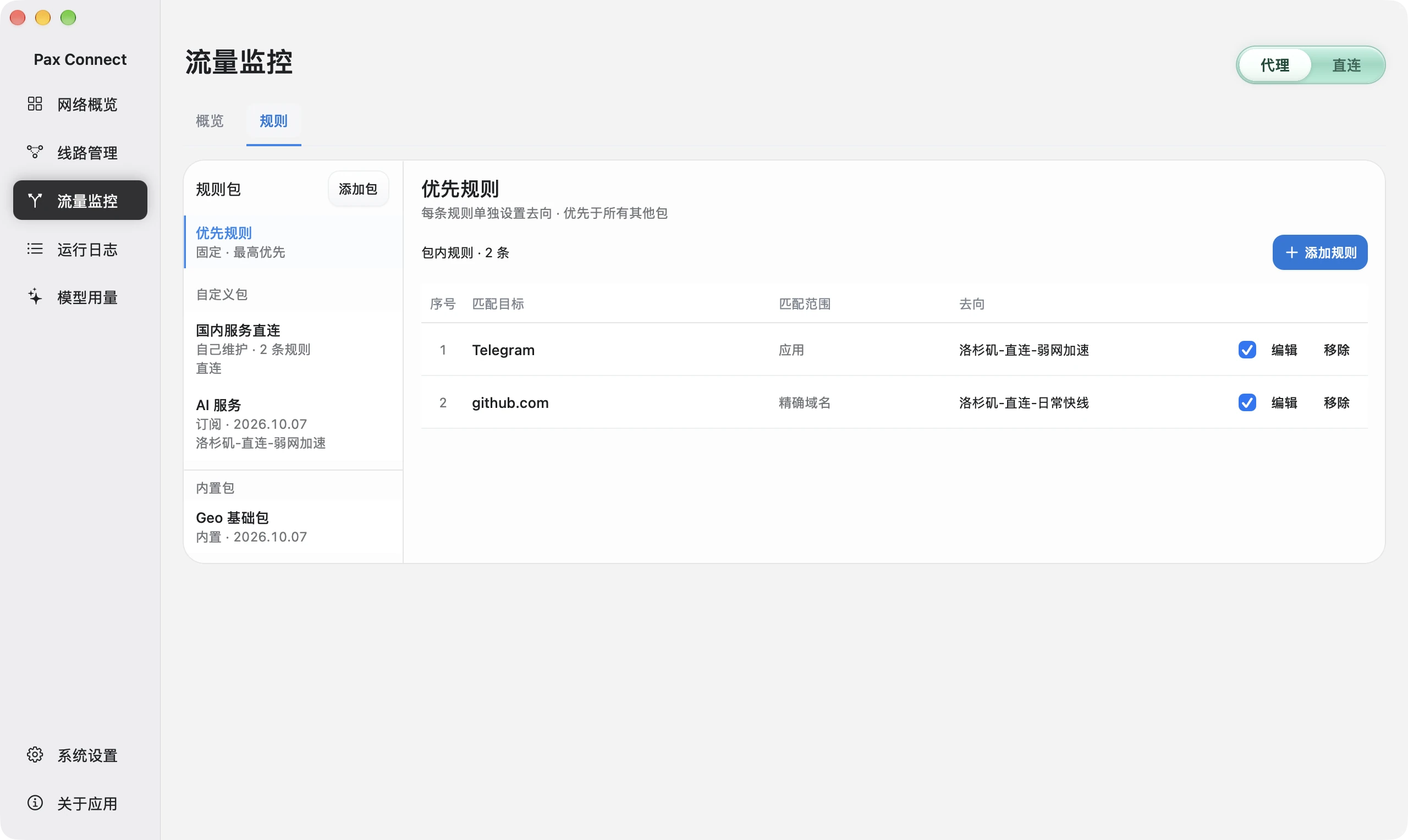
- Select a package
Priority rules run before other packages. Custom, subscribed and built-in packages have different maintenance rules.
- Inspect the condition
An application rule and an exact-domain rule are separate match types, not a combined condition.
- Verify a new connection
After saving, create new activity and check the actual route and matched rule in Overview.
Verify and troubleshoot: how to tell Claude Code used the proxy
The most direct check is /status inside Claude Code. The Proxy row shows the active proxy URL, and a value it cannot parse is marked invalid and ignored. For more detail, start with claude --debug; the log goes to ~/.claude/debug/<session-id>.txt.
If you use Pax, compare with Traffic monitoring → Overview: the Claude Code connections should appear under the connection you selected. A working network does not mean the account works, so treat 401 and 403 errors as account or relay questions.
| Symptom | Usual cause | What to do |
|---|---|---|
| Launch stops with a proxy URL error | The value lacks the http:// prefix | Write http://127.0.0.1:7890; the official docs say the error names the variable |
| No Proxy row in /status | The variable never reached the claude process | An editor launched from the Dock does not see variables exported in a terminal; put them in the env block of ~/.claude/settings.json |
| socks5:// has no effect | The official docs say SOCKS proxies are not supported | Use the HTTP or mixed port of your client, or switch to TUN |
| The current session ignores a change | Shell variables are read once at startup | Quit and run claude again |
| Certificate errors | The proxy inspects TLS, common on corporate networks | Point NODE_EXTRA_CA_CERTS at the proxy’s root certificate |
| Network works but you get sign-in or permission errors | A working proxy does not make the account usable | Check your sign-in, and run /status to see whether an Anthropic base URL is set that points somewhere else |
FAQ
Where do I change the Claude Code proxy configuration?
In two places: environment variables exported in the terminal, and the env block of ~/.claude/settings.json. The first applies to that terminal only. The second applies to all your projects, and the VS Code extension and desktop app local sessions read it too.
How do I set a proxy for the Claude Code CLI?
Run export HTTPS_PROXY=http://127.0.0.1:7890 before starting claude, then check the Proxy row in /status. To keep it, add the line to ~/.zshrc.
How do I write the Claude Code proxy env settings?
Add an env object to settings.json with the keys HTTPS_PROXY, HTTP_PROXY and NO_PROXY and string values. Keep the http:// prefix, do not write socks5://, and restart claude after saving.
Does Claude Code support a SOCKS5 proxy?
No. The official docs state that Claude Code does not support SOCKS proxies. Use the HTTP or mixed port of your proxy client, or take over the traffic with TUN.
How do I set a global proxy for Claude Code?
Either put the proxy variables in the env block of ~/.claude/settings.json so every project uses them, or turn on TUN in your proxy client to take over the whole Mac so Claude Code needs no configuration. Choosing TUN in Pax is the second approach.
Does Claude Code use the macOS system proxy?
The official docs only list environment variables and settings.json as ways to configure a proxy, and do not say it reads the macOS system proxy. Do not rely on the system proxy; use environment variables or TUN.
Does Claude Code need a proxy?
That depends on whether your network can reach the hosts it needs directly, including api.anthropic.com, claude.ai and platform.claude.com. If it can, you do not need one. You need a proxy when your network forces one or those hosts are unreachable.